Planning a Shopify migration from WooCommerce or Magento? Learn how to map URLs, set 301 redirects and protect rankings. Get a free migration quote.
You can migrate to Shopify without losing SEO if you map every old URL to a new one, set 301 redirects, carry over titles, meta descriptions and content, and test the store before launch. Most ranking drops come from broken URLs and missing metadata, not from Shopify itself. This guide covers the full Shopify migration process in the order you should follow it, the same order our Shopify migration services team uses on client stores.
Will migrating to Shopify hurt my SEO?
Not if you handle it properly. Google ranks pages, so your rankings are tied to your URLs, your content and the links pointing to them. When the new store keeps the same content and every old URL redirects to its closest new page, Google can pass the ranking signals across.
Some movement in rankings after launch is normal while Google recrawls the site. Lasting damage usually comes from avoidable problems: missing redirects, deleted pages, rewritten titles and headings, or a store that is still blocked from search engines.
What should I do before starting a Shopify migration?
Build a baseline first, because you cannot measure a loss without one.
- Crawl the old store with Screaming Frog and export every URL, title tag, meta description, H1 and status code.
- Export your top pages and queries from Google Search Console for the last 12 months.
- Export backlinks from Ahrefs or Semrush, or at least list the pages that earn links.
- Record organic traffic and organic revenue in GA4.
- Decide which pages to keep, merge or retire. Pages that bring traffic or links should not be deleted.
Avoid big content or URL changes on the old store while the migration is running. Changing too many things at once makes it hard to find the cause of a drop later.
How do I move products, collections and content to Shopify?
Shopify's Store Importer app, CSV import files and third party migration apps can move products, customers and orders. Check what your source platform supports before you pick a tool, because the coverage differs between WooCommerce and Magento.
WooCommerce stores are usually simpler to move. Products, variations, categories and blog posts export cleanly, although custom fields and plugin data need checking. Magento stores take more cleanup, because products often carry many attributes, customer groups and CMS blocks that do not map one to one.
Whichever platform you leave, clean the data before you import it:
- Keep the product handle (the URL slug) the same as the old slug wherever possible. It makes redirects easier.
- Import SEO titles, meta descriptions and image alt text, not just names and prices.
- Check variants, SKUs and inventory counts after the import.
- Move blog posts and static pages separately and confirm they imported fully.
Customer passwords cannot be transferred, so customers will need to reset their password or accept an account invite. Tell them before launch.
Can I keep my old URLs on Shopify?
Mostly no. Shopify uses fixed URL prefixes: products live under /products/, collections under /collections/, pages under /pages/ and blog posts under /blogs/. WooCommerce uses paths such as /product/ and /product-category/, and many Magento stores end URLs in .html. So most URLs will change, and that is why redirects matter more than anything else in a migration.
How do I set up 301 redirects when migrating to Shopify?
A 301 redirect tells browsers and Google that a page has moved permanently. Set them up in this order:
- Build a redirect map in a spreadsheet with one column for the old URL and one for the new URL.
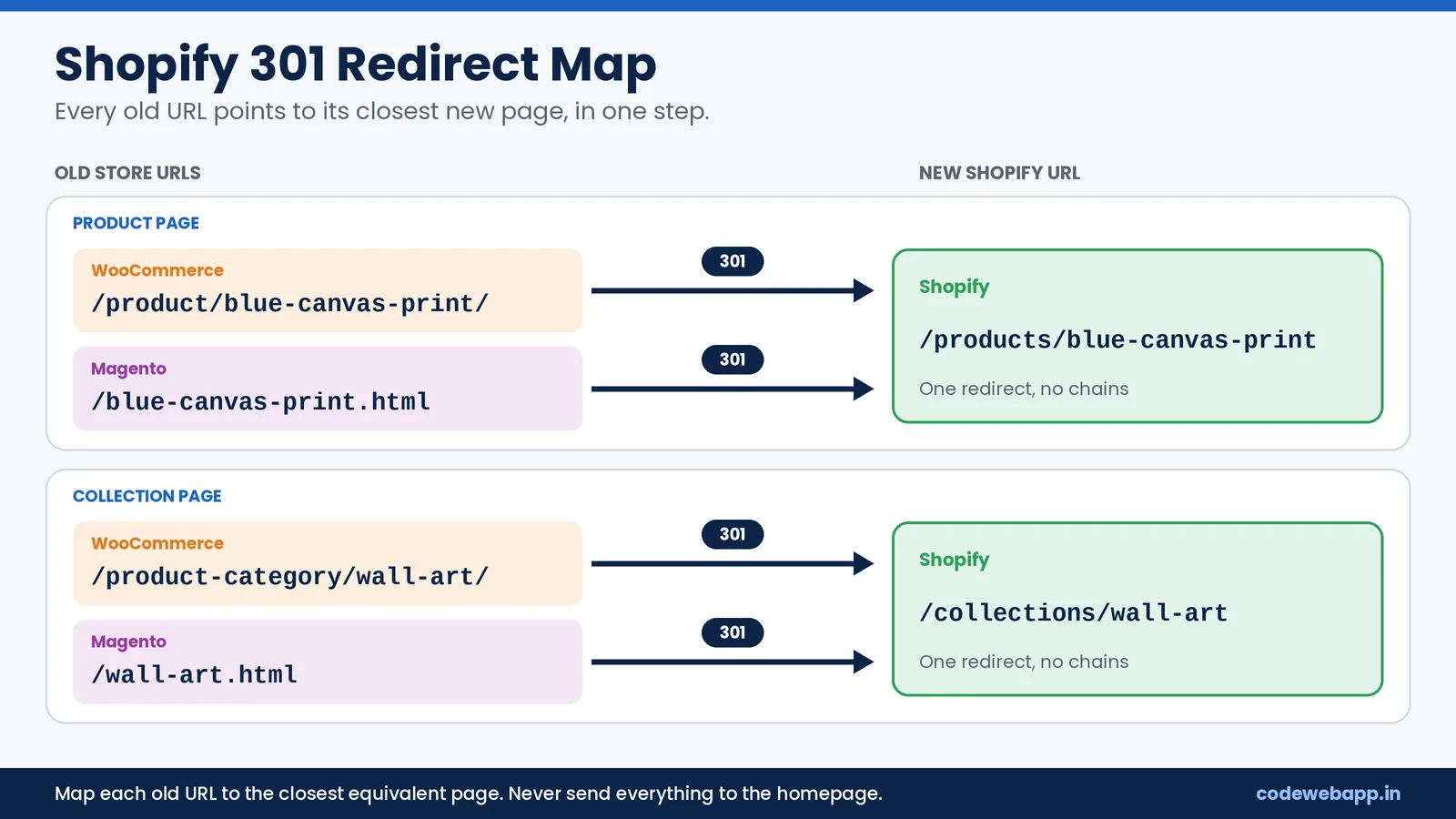
- Match every old URL to the closest equivalent page on the new store. Do not send everything to the homepage.
- Import the map in bulk from the Shopify admin under Online Store, Navigation, URL Redirects.
- Crawl the old URL list after import and confirm each one reaches its target in a single step.
- Fix redirect chains, where one redirect leads to another, because they slow crawling and waste link value.
Here is what a basic map looks like:
Old WooCommerce URL | Old Magento URL | New Shopify URL |
|---|---|---|
/product/blue-canvas-print/ | /blue-canvas-print.html | /products/blue-canvas-print |
/product-category/wall-art/ | /wall-art.html | /collections/wall-art |
For stores with thousands of URLs, a technical SEO audit before launch catches mismatches that are easy to miss by hand. If a retired product has no close match, redirect it to the nearest collection.
Which on-page SEO elements must carry over to Shopify?
Everything Google used to rank the old page should exist on the new one:
- Title tags and meta descriptions
- H1 and subheadings
- Product and category descriptions
- Image file names and alt text
- Internal links, updated to point straight to the new URLs
- Canonical tags
- Structured data for products, breadcrumbs and reviews
- Hreflang tags, if you sell in more than one region
Shopify themes add canonical tags and basic product schema by default, and the platform generates the sitemap.xml and robots.txt files for you. Themes and review apps vary, though, so test a few pages with Google's Rich Results Test rather than assuming everything is in place.
How do I test the new Shopify store before going live?
Build and test on an unpublished theme or development store. Before launch, check these points:
- Crawl the new store and compare titles, meta descriptions, H1s and page counts against your old crawl.
- Test the redirect map in list mode.
- Run key pages through PageSpeed Insights on mobile.
- Place test orders to check checkout, payments, taxes and shipping rates.
- Confirm GA4 and your ad tags fire correctly.
Also remove the storefront password. A password protected store blocks search engines completely, and it is one of the easiest mistakes to make on launch day.
What should I do on launch day?
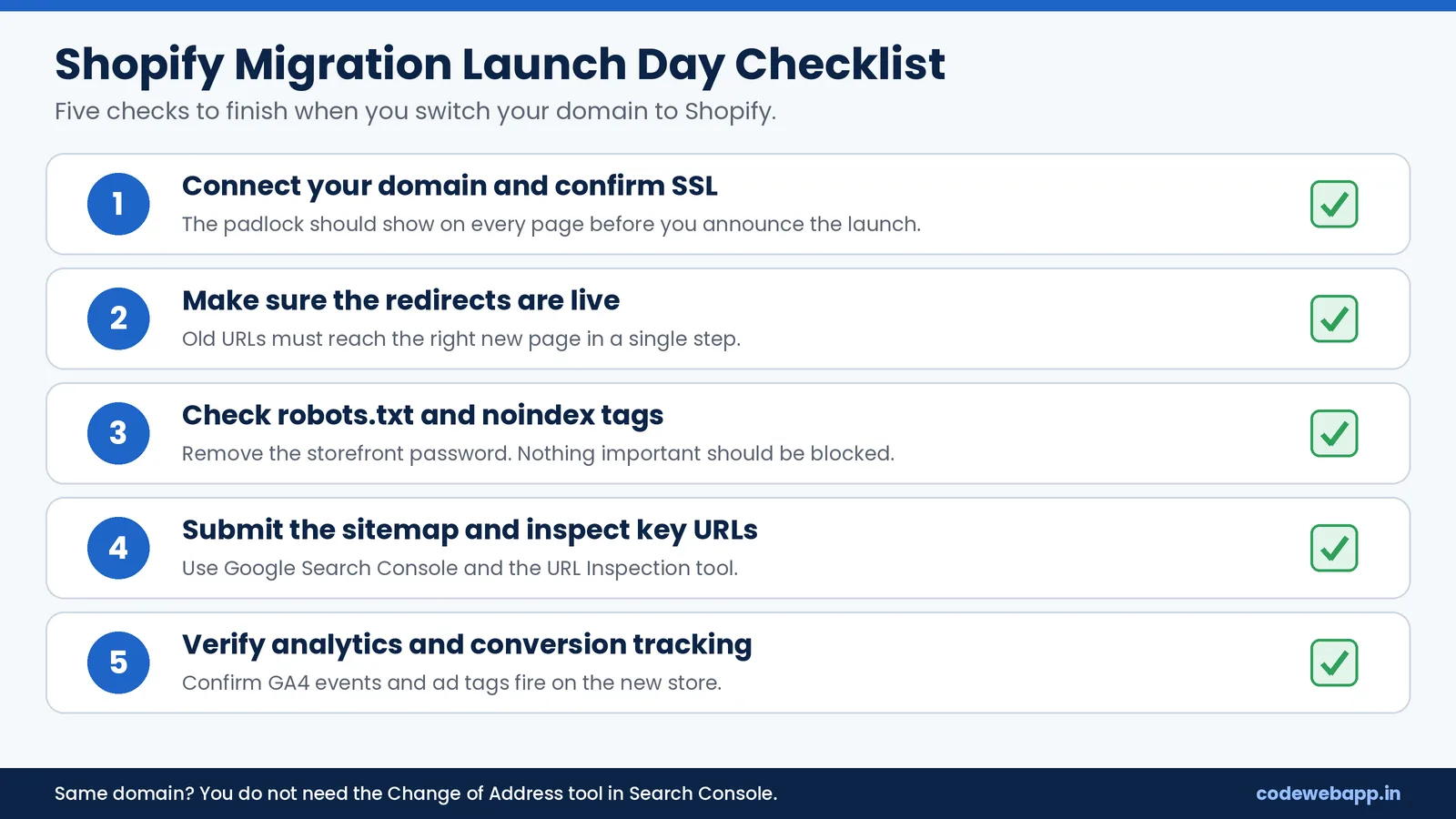
- Connect your domain and confirm that the SSL certificate is active.
- Make sure the redirects are live and the old URLs reach the right pages.
- Check that robots.txt does not block the site and that no page carries a noindex tag by mistake.
- Submit the new sitemap in Google Search Console and inspect a few important URLs with the URL Inspection tool.
- Verify analytics and conversion tracking.
If you keep the same domain, you do not need Google's Change of Address tool. Use it only when the domain itself changes. Choose a time when traffic is lower, so you have room to fix problems quickly.
How do I monitor rankings after migrating to Shopify?
Check Search Console every day for the first couple of weeks, then weekly. Look at the Pages report for new 404 errors and indexing problems, compare clicks and impressions against your baseline, and watch organic revenue in GA4.
Every 404 that used to be a real page needs a redirect. If an important page drops and stays down, compare it with the old version and look for changed content, a wrong canonical tag or a broken redirect. Keep your redirects in place for at least a year, as Google recommends for site moves. If you want ongoing help with category pages, product pages and tracking, our ecommerce SEO services in India cover that after the move.
How long does it take for rankings to recover after a Shopify migration?
There is no fixed timeline, and any exact number would be a guess. Recovery depends on the size of the store, how clean the redirects are and how much the content changed. Stores that keep their content and map redirects carefully usually settle sooner, while stores that change content, structure and URLs together can take longer. Your baseline is the best signal: if clicks and impressions for your top pages return to the earlier level and stay there, the move has worked. If they do not, audit those pages first.
What are the most common Shopify migration SEO mistakes?
- Launching without a redirect map
- Redirecting every old URL to the homepage
- Importing products without SEO titles and meta descriptions
- Leaving the password page on or a noindex tag in place
- Rewriting product and category copy during the same launch
- Creating redirect chains
- Forgetting blog posts, old landing pages and internal links
- Skipping analytics setup, so there is no data to compare
Should I hire a Shopify migration company or do it myself?
You can do it yourself if your catalog is small, your setup is simple and you are comfortable with CSV files and redirects. Get help when you have a large catalog, a Magento store with many custom attributes, custom features, several languages or currencies, or when organic search brings most of your revenue.
Timelines depend on catalog size, data quality, custom features and how quickly approvals come back, so a scoped quote is more reliable than a generic estimate. If you also need a new design or custom functionality, see our ecommerce website development company in India page and browse our portfolio.
Ready to plan your Shopify migration?
Share your store URL and current platform, and we will review your URLs, traffic and redirect needs before sending a clear scope. Contact CodeWebApp for a free migration consultation.